

TL;DR
When teams embed analytics without a data layer, they’re essentially doing this:
- Point dashboards directly at production databases, event streams, or raw warehouse tables
- Embed the visuals into the app
- Hope the metrics stay consistent across customers, teams, and time
The visuals might work for the first demo. They might even work for your first few customers.
But as soon as you scale:
- Different customers want different definitions of the “same” metric
- Users want more filters, more drilldowns, more joins
- New product features introduce new events, columns, and naming conventions
- The embedded experience needs to enforce tenant-level security every time
- Performance starts collapsing under real usage patterns
Without a data layer, every one of these becomes a brittle workaround.
Table of Contents
- What is a “Data Layer” (In Embedded Analytics)?
- What the data layer actually does (key functions)
- 8 Ways Embedded Analytics Breaks Without a Data Layer
- “The numbers don’t match” becomes your #1 support ticket
- Every customer request turns into a custom build
- Embedded performance collapses under real usage
- Multi-source analytics hits a wall
- Security turns into a patchwork of fragile rules
- Schema changes constantly break dashboards
- Exports don’t match what users see
- AI analytics gives confident but wrong answers
- Embedded Analytics as a Product Feature
- The Checklist: Do You Have a Real Embedded Analytics Data Layer?
- The Bottom Line
- Frequently Asked Questions
- What is a data layer in embedded analytics?
- Why can’t embedded analytics work directly on raw data?
- Is a data warehouse the same as a data layer?
- How does a data layer improve embedded analytics performance?
- Why is a data layer required for secure embedded analytics?
- Can you add AI to embedded analytics without a data layer?
What is a “Data Layer” (In Embedded Analytics)?
In embedded analytics, a data layer is the middle system that sits between your raw application data (databases, APIs, events) and the analytics experience you embed (charts, dashboards, AI, exports). Its job is to prepare, organize, secure, and interpret data before it ever reaches a visualization.
This breakdown focuses on why embedded analytics fails. For a deeper look at how embedded analytics should be designed, including where the data layer fits in a modern SaaS stack, see this guide on embedded analytics architecture for SaaS.
What the data layer actually does (key functions)
It mainly does the below:
- Data Modeling: The Foundation of Embedded Analytics
Embedded analytics, most of the time fails because there is no real data model.
A proper embedded analytics data layer defines analytics once and reuses it everywhere. It centrally defines metrics like ARR, active users, and conversion rate; dimensions such as customer, region, plan, product, and time; and governed relationships that allow safe joins across databases, NoSQL systems, APIs, and documents.
Without data modeling, every embedded dashboard reimplements business logic. Metrics drift, dashboards disagree, performance degrades, and users stop trusting the analytics inside your product.
- Provides the Business Logic
Embedded analytics requires shared business logic, not just visualizations.
A real data layer handles calculations, time-series logic, normalization across data sources, and reusable derived fields. When this logic lives in frontend code or is copied into individual dashboard SQL, it cannot scale across different embedded use cases if every customer request turns into custom work, and analytics becomes brittle instead of repeatable.
These challenges often push teams into building more and more custom logic internally, until analytics becomes a full product of its own. This is where the question of build vs buy embedded analytics comes in for organizations.
- Enforce Security and Tenant Isolation
For embedded analytics, security must be systemic and enforced by design.
The data layer applies row-level security, user and role context, tenant isolation, and parameterized filtering such as customer_id = X. When these controls are not enforced at the data layer, security logic fragments across dashboards and application code, making embedded analytics fragile and risky rather than trustworthy.
This is especially critical for customer-facing and white-label analytics, where different tenants expect complete data isolation and consistent behavior. Teams exploring white label embedded analytics often discover that branding is easy, but secure data modeling is not.
- Allow for Reusability to ensure Scalability
A single governed data layer should power embedded dashboards, in-app charts, exports, alerts, and AI-driven insights.
Without a shared data layer, every embedded experience becomes a one-off integration, business logic is duplicated across features, and analytics accumulates technical debt instead of compounding value.
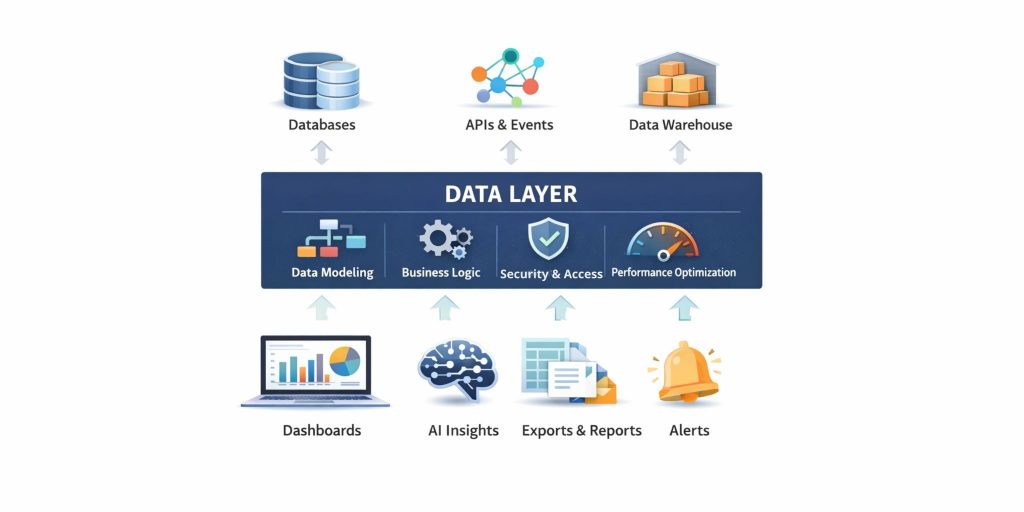
Embedded analytics only works when the data layer comes first.
8 Ways Embedded Analytics Breaks Without a Data Layer
“The numbers don’t match” becomes your #1 support ticket
This is usually the first issue and the one customers notice fastest.
The same KPI shows up with different values across dashboards because each one has its own logic, different teams wrote different SQL and filters behave inconsistently across data sources. Your customers don’t care why this happens. They just stop trusting the analytics inside your product.
A data layer fixes this by defining metrics once and reusing them everywhere.
Every customer request turns into a custom build
Saas customers want custom dimensions, new segmentation, different time windows and sometimes entirely different definitions of the same metric like churn based on invoices instead of usage.
If a data layer is not there, the only way to support this is by duplicating dashboards per customer, duplicating logic per tenant, and slowly creating a tangled system no one wants to touch.
A data layer allows for reusable models with controlled customization and so flexibility doesn’t turn into chaos.
Customization is also why many teams struggle when comparing vendors, most tool comparisons focus on features, not on whether the platform actually provides a scalable data layer. If you’re evaluating platforms, this guide on how to evaluate embedded analytics tools explains what to look for beyond charts and dashboards.
Embedded performance collapses under real usage
Dashboards built directly on raw tables often rely on expensive joins, unindexed filters, massive aggregations, and queries that hit production systems at peak times.
In embedded contexts, users expect application-level speed. They don’t tolerate latency.
A data layer improves performance through optimized query paths, caching, materialization, and pre-aggregation, so analytics feels native, not bolted on.
Multi-source analytics hits a wall
Your product data alone is rarely enough. Customers want insights that combine product usage with billing, CRM with support tickets, app events with operational systems, and logs or search data with transactions.
When dashboards are tied directly to a single source, this becomes either impossible or painfully expensive to maintain.
A data layer makes multi-source analytics feasible by enabling governed joins and unified datasets across systems.
Security turns into a patchwork of fragile rules
Embedded analytics requires tenant isolation on every query, user-level permissions, row-level security, parameter injection, and auditability.
Without a data layer, these controls get scattered across dashboard filters, URL parameters, and app-side conditionals.
A data layer makes access control enforceable, consistent, and testable.
Schema changes constantly break dashboards
Without a data layer, dashboards are tightly coupled to the physical schema, so every change results in broken charts, frustrated customers, emergency fixes, and promises to “clean it up next sprint.”
A data layer decouples analytics from raw schemas by exposing stable, modeled entities that don’t break every time the backend changes.
Exports don’t match what users see
Embedded analytics isn’t just about dashboards and visualizations visible in the app. Users also need the ability to export CSV of their analysis, PDFs for reporting, and schedule reports for leadership.
Without a data layer, exports often don’t match on-screen numbers because calculations differ, filters behave differently, or export jobs query data in a completely different way.
A data layer ensures the same logic powers visuals, exports, and reports and the numbers stay consistent everywhere.
AI analytics gives confident but wrong answers
AI-powered analytics, summaries, anomaly explanations, natural-language questions will only work when the underlying data is consistent and well-modeled.
Without a modeled, governed data layer, AI features amplify inconsistencies instead of fixing them. This is why AI-powered embedded analytics requires far more than a chat interface or LLM integration.
A data layer is the foundation for safe, accurate, and trustworthy AI analytics.
Embedded Analytics as a Product Feature
A real data layer powers embedded analytics and ensures:
- Metrics are consistent across the product
- Dashboards load fast and stay stable
- Security is enforced systematically
- Multi-source analysis becomes a feature, not a project
- New analytics use cases are built by configuration, not custom code
- AI insights become safer and more accurate
The Checklist: Do You Have a Real Embedded Analytics Data Layer?
If you answer “no” to more than 2-3 of these, you’re likely feeling the pain already.
- Do we have centralized KPI definitions used across dashboards and exports?
- Can we reuse the same modeled dataset across multiple embedded experiences?
- Do we enforce tenant and role-based access at the data/model layer?
- Can we join across key sources without custom ETL per dashboard?
- Can we change raw schemas without breaking embedded dashboards?
- Can we support per-customer customization without copying dashboards?
- Can we guarantee performance under peak embedded usage?
The Bottom Line
Embedded analytics doesn’t fail because embedding is hard.
It fails because teams try to embed analytics without building the layer that makes analytics reliable.
Without a data layer you end up shipping just dashboards without any trust, consistency or scalability.
However, with a data layer, embedded analytics becomes a durable product capability and not just a perpetual engineering and support burden
Knowi approaches embedded analytics differently by treating the data layer as a first-class system, not an afterthought. For a full walkthrough of how this works in practice, see the complete guide to embedded analytics with Knowi.
Frequently Asked Questions
What is a data layer in embedded analytics?
A data layer is the system between raw data sources and embedded analytics that models data, defines metrics, enforces security, and prepares data for dashboards, exports, and AI insights.
Why can’t embedded analytics work directly on raw data?
Raw data lacks consistent metric definitions, governed joins, performance optimizations, and security controls. Without a data layer, dashboards become inconsistent, slow, and fragile as usage scales.
Is a data warehouse the same as a data layer?
No. A warehouse stores data, but a data layer models it for analytics. The data layer defines business logic, relationships, permissions, and reusable datasets used by embedded experiences.
How does a data layer improve embedded analytics performance?
A data layer improves performance through optimized query paths, caching, pre-aggregation, and materialization ensuring embedded analytics feels like part of the product, not a BI tool.
Why is a data layer required for secure embedded analytics?
Embedded analytics requires tenant isolation, row-level security, and user context on every query. A data layer enforces these rules consistently, instead of relying on fragile dashboard filters or URL parameters.
Can you add AI to embedded analytics without a data layer?
Not reliably. AI analytics requires consistent metrics, clear relationships, and governed data. Without a data layer, AI produces confident but incorrect insights due to missing context and inconsistent logic.