

TL;DR
Stop replicating data between Elasticsearch and MySQL with ETL pipelines. Query-time federation joins both sources in real-time without copying data, no stale duplicates, no doubled storage costs, no sync pipelines to maintain. Write a single SQL query that spans Elasticsearch and MySQL, and get always-current results in hours of setup instead of weeks.
Table of Contents
Introduction
You have logs in Elasticsearch. Customer data in MySQL. Now someone wants a report joining both.
The traditional answer: build an ETL pipeline. Replicate data. Maintain sync jobs. Debug when they break.
There’s a simpler approach: query-time federation that joins data across sources without moving it.
The Traditional Approach: Data Replication
How Teams Currently Solve This
Option A: Replicate MySQL to Elasticsearch
Tools like Debezium, Logstash, or go-mysql-elasticsearch sync MySQL data to Elasticsearch:
# Logstash config to sync MySQL customers to Elasticsearch
input {
  jdbc {
    jdbc_connection_string => "jdbc:mysql://localhost:3306/app"
    jdbc_user => "sync_user"
    schedule => "*/5 * * * *"  # Every 5 minutes
    statement => "SELECT * FROM customers WHERE updated_at > :sql_last_value"
  }
}

output {
  elasticsearch {
    hosts => ["elasticsearch:9200"]
    index => "customers"
    document_id => "%{id}"
  }
}
Problems:
- Data is stale between sync intervals
- Schema changes require pipeline updates
- Sync failures create data inconsistency
- Storage costs double (data in both systems)
- Pipeline maintenance is ongoing work
Option B: Replicate Elasticsearch to MySQL
Extract Elasticsearch data to a SQL database for joining:
# Python script to sync ES to MySQL
def sync_elasticsearch_to_mysql():
    # Query Elasticsearch
    # Transform nested documents to flat rows
    # Handle array fields
    # Insert/update MySQL
    # Track what's synced
    # Handle failures
    # Schedule refreshes
Problems:
- Loses Elasticsearch’s nested document structure
- High-cardinality data explodes row counts
- Real-time data becomes batch data
- Same maintenance burden as Option A
The Better Approach: Query-Time Federation
How It Works
Data federation platforms connect to both Elasticsearch and MySQL simultaneously, joining data at query time without replication.
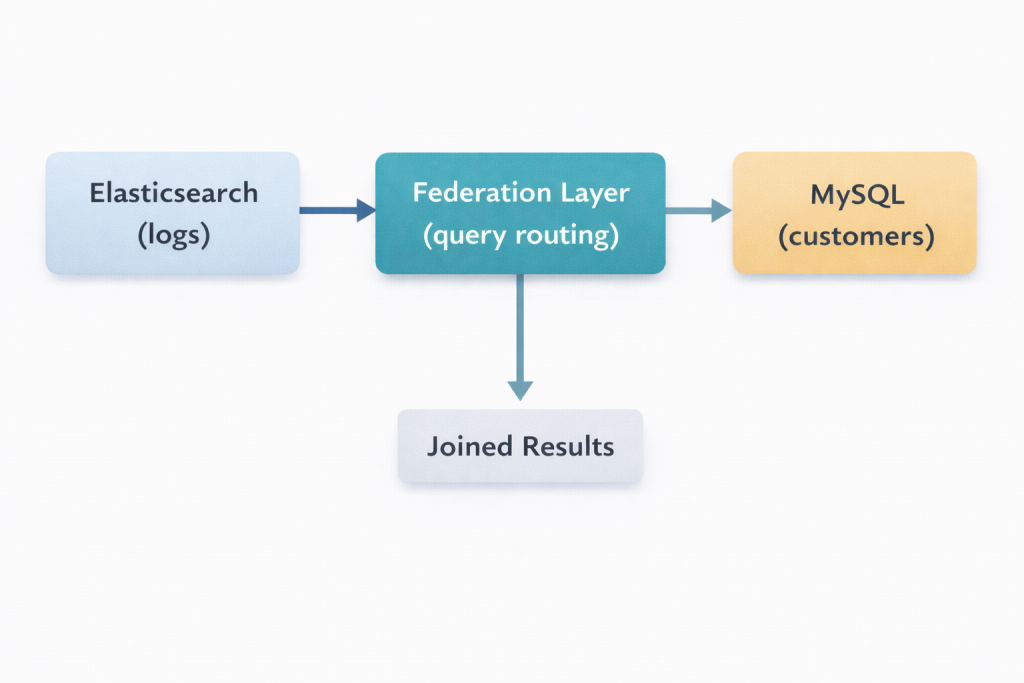
Query Example
-- Single query joining Elasticsearch logs with MySQL customers
SELECT
  es_logs.event_type,
  es_logs.timestamp,
  es_logs.error_message,
  mysql_customers.company_name,
  mysql_customers.plan_tier,
  mysql_customers.account_manager
FROM elasticsearch.application_logs es_logs
JOIN mysql.customers mysql_customers
  ON es_logs.customer_id = mysql_customers.id
WHERE es_logs.timestamp > NOW() - INTERVAL 24 HOUR
  AND es_logs.level = 'ERROR'
ORDER BY es_logs.timestamp DESC
LIMIT 100
What happens:
1. Platform parses the query
2. Routes Elasticsearch portion to ES cluster (with native ES query)
3. Routes MySQL portion to MySQL database
4. Joins results in federation layer
5. Returns unified result set
Advantages Over ETL
| Aspect | ETL Pipeline | Query-Time Federation |
|---|---|---|
| Data freshness | Minutes to hours stale | Real-time |
| Storage cost | 2x (duplicated data) | 1x (data stays in place) |
| Setup time | Days to weeks | Hours |
| Schema changes | Pipeline updates needed | Automatic |
| Maintenance | Ongoing | Minimal |
| Sync failures | Data inconsistency | Not applicable |
ETL duplicates data between systems and introduces staleness. Federation queries both sources in real-time and joins results on the fly.
Implementation Guide
Step 1: Connect Data Sources
In a federation platform like Knowi:
Elasticsearch connection:
Type: Elasticsearch
Host: your-cluster.es.amazonaws.com
Port: 9243
Auth: API Key
Indices: logs-*, events-*, metrics-*
MySQL connection:
Type: MySQL
Host: mysql-primary.internal
Port: 3306
Database: production
Auth: Username/Password
Step 2: Write Federated Query
-- Query that would be impossible without federation
SELECT
  DATE_TRUNC('hour', es.timestamp) as hour,
  mysql.region,
  mysql.plan_tier,
  COUNT(*) as request_count,
  AVG(es.response_time_ms) as avg_latency,
  SUM(CASE WHEN es.status >= 500 THEN 1 ELSE 0 END) as error_count
FROM elasticsearch.api_logs es
JOIN mysql.organizations mysql ON es.org_id = mysql.id
WHERE es.timestamp > NOW() - INTERVAL 7 DAY
GROUP BY 1, 2, 3
ORDER BY hour DESC, request_count DESC
Step 3: Visualize Results
Build dashboards that combine both data sources:
- From Elasticsearch: Request volumes, latency distributions, error rates
- From MySQL: Customer segments, plan tiers, account ownership
- Combined: Error rates by customer tier, latency by region, usage by plan
Real-World Use Cases
Use Case 1: Customer Support Dashboards
Data sources: – Elasticsearch: Application logs, error events – MySQL: Customer accounts, support tickets, subscription data
Joined query:
SELECT
  mysql.customer_name,
  mysql.plan,
  mysql.csm_name,
  COUNT(DISTINCT es.session_id) as sessions_with_errors,
  COUNT(*) as total_errors,
  MAX(es.timestamp) as last_error
FROM elasticsearch.errors es
JOIN mysql.customers mysql ON es.customer_id = mysql.id
WHERE es.timestamp > NOW() - INTERVAL 30 DAY
GROUP BY mysql.customer_id
HAVING total_errors > 10
ORDER BY total_errors DESC
Result: Support team sees which high-value customers are experiencing issues.
Use Case 2: Revenue Attribution
Data sources: – Elasticsearch: Product usage events, feature interactions – PostgreSQL: Billing records, subscription changes
Joined query:
SELECT
  pg.subscription_tier,
  es.feature_name,
  COUNT(DISTINCT es.user_id) as users_using_feature,
  SUM(pg.mrr_change) as mrr_from_upgrades
FROM elasticsearch.feature_events es
JOIN postgresql.billing_events pg
  ON es.account_id = pg.account_id
  AND pg.event_type = 'upgrade'
  AND pg.event_date BETWEEN es.first_use_date AND es.first_use_date + INTERVAL 30 DAY
GROUP BY 1, 2
ORDER BY mrr_from_upgrades DESC
Result: Product team sees which features drive upgrades.
Use Case 3: Security Incident Investigation
Data sources: – Elasticsearch: Security logs, authentication events – MySQL: User directory, role assignments
Joined query:
SELECT
  es.source_ip,
  es.timestamp,
  es.action,
  mysql.username,
  mysql.department,
  mysql.role,
  mysql.last_password_change
FROM elasticsearch.security_logs es
JOIN mysql.users mysql ON es.user_id = mysql.id
WHERE es.action IN ('failed_login', 'privilege_escalation', 'unusual_access')
  AND es.timestamp > NOW() - INTERVAL 1 HOUR
ORDER BY es.timestamp DESC
Result: Security team investigates incidents with full user context.
Handling Complex Joins
Joining Nested Elasticsearch Documents
Elasticsearch stores nested objects that don’t map directly to SQL rows. Federation platforms handle this:
// Elasticsearch document with nested array
{
  "order_id": "12345",
  "customer_id": "cust_789",
  "items": [
    {"product": "Widget A", "quantity": 2, "price": 10.00},
    {"product": "Widget B", "quantity": 1, "price": 25.00}
  ]
}
-- Query that unnests and joins
SELECT
mysql.customer_name,
es.order_id,
es_items.product,
es_items.quantity,
es_items.price
FROM elasticsearch.orders es
UNNEST es.items as es_items
JOIN mysql.customers mysql ON es.customer_id = mysql.id
WHERE es.order_date > '2024-01-01'Joining with Aggregated Elasticsearch Data
-- Aggregate Elasticsearch data, then join with MySQL
WITH es_summary AS (
  SELECT
    customer_id,
    COUNT(*) as event_count,
    AVG(duration_ms) as avg_duration
  FROM elasticsearch.events
  WHERE timestamp > NOW() - INTERVAL 30 DAY
  GROUP BY customer_id
)
SELECT
  mysql.company_name,
  mysql.plan,
  es_summary.event_count,
  es_summary.avg_duration
FROM es_summary
JOIN mysql.customers mysql ON es_summary.customer_id = mysql.id
ORDER BY es_summary.event_count DESC
Performance Considerations
When Federation Performs Well
- Selective queries: Filters reduce data transferred
- Indexed join keys: Join columns are indexed in both systems
- Reasonable result sets: Final output is thousands of rows, not millions
- Aggregations: Summaries computed in source systems before joining
When You Might Need ETL
- Full table scans: Queries touch all data in both systems
- Massive result sets: Joins produce millions of rows
- Offline analysis: Historical analysis on static data snapshots
- Extreme low latency: Sub-100ms response times required
Optimization Tips
- Filter early: Push filters to source systems
-- Good: filter in WHERE
SELECT ... WHERE es.timestamp > NOW() - INTERVAL 1 DAY

-- Bad: filter in HAVING after full scan
SELECT ... HAVING timestamp > NOW() - INTERVAL 1 DAY\- Limit result sets: Use LIMIT and pagination
SELECT ... LIMIT 1000 OFFSET 0- Aggregate at source: Let Elasticsearch handle its aggregations
-- Elasticsearch aggregates efficiently
SELECT customer_id, COUNT(*), AVG(latency)
FROM elasticsearch.logs
GROUP BY customer_id
Migration from ETL to Federation
Step 1: Identify Sync Jobs
List all pipelines syncing data between Elasticsearch and SQL:
- Logstash configs
- Debezium connectors
- Custom sync scripts
- Scheduled ETL jobs
Step 2: Map to Federated Queries
For each sync job, write the equivalent federated query:
Before (ETL approach):
1. Sync customers from MySQL to ES (every 5 min)
2. Query ES with customer data embedded
3. Dashboard shows joined data (5 min stale)
After (federation approach):
1. Query ES for logs
2. Query MySQL for customers (real-time)
3. Join in federation layer
4. Dashboard shows joined data (real-time)
Step 3: Validate and Transition
- Run federated queries alongside existing reports
- Validate results match
- Redirect users to federated dashboards
- Decommission sync pipelines
The Bottom Line
ETL pipelines that replicate data between Elasticsearch and SQL databases:
- Create stale data
- Double storage costs
- Require ongoing maintenance
- Break when schemas change
Query-time federation:
- Joins data in real-time
- Keeps data in source systems
- Requires minimal setup
- Adapts to schema changes automatically
For most analytical use cases, federation is simpler, cheaper, and more accurate.
Frequently Asked Questions
Can you join Elasticsearch with MySQL without copying data?
Yes. Query-time data federation connects to both Elasticsearch and MySQL simultaneously and joins results at query time. Data stays in its original source, no replication, no sync pipelines, no ETL jobs. The federation layer routes native queries to each system, collects results, and performs the join in memory.
How does query-time federation differ from ETL?
ETL copies data from one system to another on a schedule, creating stale duplicates that require ongoing maintenance. Federation queries both sources in real-time at the moment you run a query. Data is always current, storage costs don’t double, and there are no sync pipelines to break when schemas change.
What types of joins are supported between Elasticsearch and MySQL?
Federation platforms support standard SQL joins including INNER JOIN, LEFT JOIN, and cross-source aggregations. You can also join aggregated Elasticsearch results with MySQL tables, unnest Elasticsearch nested documents before joining, and use CTEs (WITH clauses) to pre-aggregate before joining.
Does joining Elasticsearch with MySQL affect query performance?
Performance depends on query design. Federation works best with selective queries (filters that reduce data transferred), indexed join keys in both systems, reasonable result sets (thousands of rows, not millions), and aggregations computed in the source systems before joining. For full table scans on massive datasets, ETL may still be appropriate.
Can I join Elasticsearch with databases other than MySQL?
Yes. Federation platforms like Knowi support joining Elasticsearch with PostgreSQL, MongoDB, REST APIs, Amazon Redshift, Snowflake, and dozens of other data sources. The same query syntax works regardless of which sources you’re joining.
How do I handle nested Elasticsearch documents when joining with MySQL?
Federation platforms can unnest Elasticsearch nested arrays into rows before joining. For example, an Elasticsearch order document with a nested items array can be flattened so each item becomes a row, then joined with MySQL product or customer tables.
When should I use ETL instead of federation for Elasticsearch + MySQL joins?
ETL is better for full table scans touching all data in both systems, massive result sets producing millions of rows, offline historical analysis on static snapshots, and scenarios requiring sub-100ms response times on pre-joined data. For most analytical and reporting use cases, federation is simpler and more accurate.
Next Steps
Ready to eliminate Elasticsearch sync pipelines?
- Learn: How to Join Elasticsearch with Other Datasources
- Compare: Elasticsearch vs MySQL: What to Choose?
- Explore: Native Elasticsearch Analytics Platform
Request a Demo → See live how you can natively integrate with Elasticsearch data and join it with MySQL.